After going through the steps to create an External Content Type using SharePoint Designer with a SQL Server back end, you create a new SharePoint list to display the a table, accepting all the defaults along the way. Read, Update, and Delete operations work OK, but when you try to add a new item, you receive the error
Failed to create a list item for this external list based on the Entity (External Content Type) ‘<ListName>’ in EntityNamespace ‘http://yourSharePointsite’. Details: The query against the database caused an error.
further inspection of the ULS logs on the SharePoint server reveals the error
Violation of PRIMARY KEY constraint ‘PK_DatabaseName’. Cannot insert duplicate key in object ‘dbo.DatabaseName’. The duplicate key value is (00000000-0000-0000-0000-000000000000). The statement has been terminated.
This is caused because the primary key is of type System.Guid and the SQL server is supposed to generate the Guid. SharePoint, by default, will try to insert a value of nothing, or 00000000-0000-0000-0000-000000000000.
The following archived discussion provided a solution https://social.microsoft.com/Forums/partner/en-us/c38dd7e9-4c39-4dac-85f2-9fb811ea6a76/how-do-i-set-a-new-guid-as-the-default-value-for-a-field-in-bcs-using-sharepoint-designer
Edit the “Create” operation in SharePoint Designer; on the Input Parameters screen, click on “Filter:”

Set the filter type to Activity Id, and set it to Default.
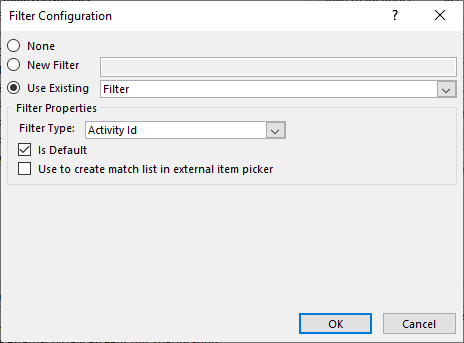
Now you should be able to create new items.
 Learning SharePoint